Lossy vs Lossless Image Compression Explained
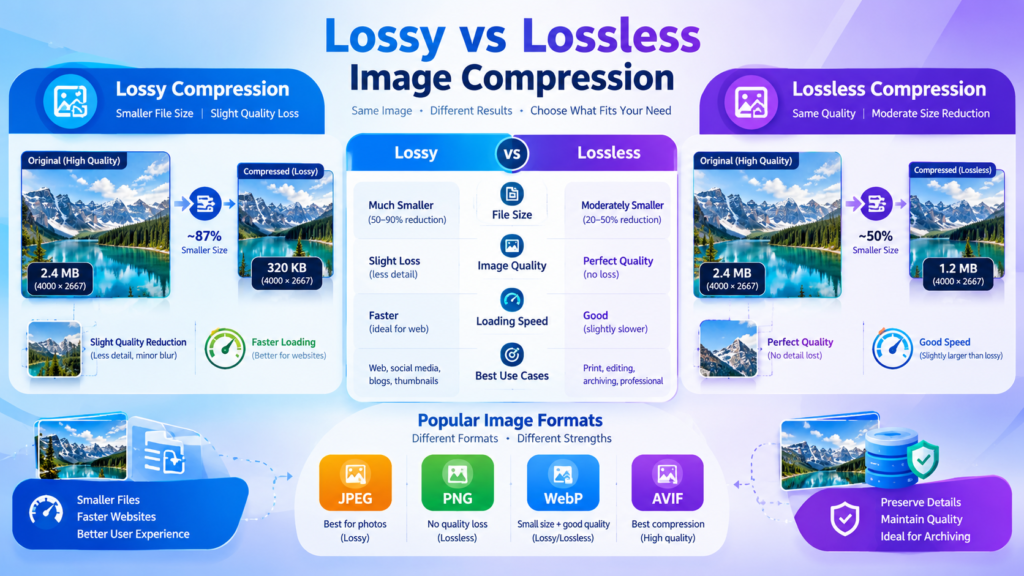
Images are essential for websites, apps, social media, and digital documents, but large image files can slow down loading times, consume storage space, and hurt user experience. The two main methods used to reduce image file sizes are lossy compression and lossless compression. The difference is simple: lossy compression permanently removes some image data to achieve smaller file sizes, while lossless compression reduces file size without removing any original image information.
Understanding when to use each format can help you create faster websites, improve SEO performance, and maintain the right balance between image quality and file size.
What Is Image Compression?
Image compression is the process of reducing the size of an image file so it takes up less storage space and loads more quickly.
Without compression, image files can be extremely large, especially high-resolution photos taken with modern smartphones and digital cameras. Large files increase bandwidth usage, slow down websites, and can negatively affect user experience.
Compression works by identifying and reducing redundant or unnecessary image data. Depending on the method used, this process may preserve all original information or intentionally discard some details that are less noticeable to the human eye.
The two primary categories are:
- Lossy image compression
- Lossless image compression
Each serves a different purpose.
What Is Lossy Image Compression?
Lossy image compression reduces file size by permanently removing certain image data. Once the image is compressed and saved, some information cannot be recovered.
The goal is to create a much smaller file while maintaining visual quality that appears acceptable to most viewers.
How Lossy Compression Works
Lossy compression analyzes an image and identifies details that can be simplified or removed. These changes are often difficult for people to notice, particularly at moderate compression levels.
The compression process may:
- Reduce color variation
- Simplify image details
- Remove subtle visual information
- Optimize repeated image patterns
As a result, file sizes become significantly smaller than the original image.
Common Lossy Image Formats
Some of the most widely used lossy formats include:
- JPEG (JPG)
- WebP (lossy mode)
- AVIF (lossy mode)
- HEIC
These formats are especially popular for photographs and web images.
Advantages of Lossy Compression
Smaller File Sizes
Lossy compression can dramatically reduce image sizes, making it ideal for websites and online content.
Faster Website Loading Speed
Smaller images load more quickly, improving user experience and reducing bounce rates.
Better SEO Performance
Page speed is an important factor for search visibility and user satisfaction. Optimized images can contribute to faster-loading pages.
Reduced Storage Requirements
Whether you’re managing a blog, e-commerce store, or digital portfolio, smaller images require less storage space.
Disadvantages of Lossy Compression
Permanent Quality Loss
Once data is removed, it cannot be restored.
Repeated Saving Causes Degradation
Every time a JPEG image is edited and saved again, quality may decrease further.
Visible Artifacts
Over-compression can create noticeable visual defects such as:
- Blurriness
- Pixelation
- Color banding
- Blocky patterns
What Is Lossless Image Compression?
Lossless image compression reduces file size without removing any image data. Every piece of information from the original file remains intact.
When a losslessly compressed image is decompressed, it can be restored exactly as it originally existed.
How Lossless Compression Works
Instead of deleting information, lossless compression reorganizes data more efficiently.
Think of it like packing a suitcase more efficiently without throwing anything away. Everything remains inside, but less space is used.
The original image quality remains unchanged.
Common Lossless Image Formats
Popular lossless formats include:
- PNG
- GIF
- TIFF
- BMP
- WebP (lossless mode)
- AVIF (lossless mode)
These formats are commonly used when image accuracy is critical.
Advantages of Lossless Compression
Perfect Image Quality
No visual information is lost during compression.
Ideal for Editing
Designers and photographers often need original image quality for future modifications.
Sharp Text and Graphics
Logos, screenshots, diagrams, and illustrations maintain crisp edges.
Multiple Saves Without Degradation
You can edit and save a lossless image repeatedly without quality loss.
Disadvantages of Lossless Compression
Larger File Sizes
Lossless formats are usually larger than lossy alternatives.
Increased Storage Requirements
Higher-quality files take up more disk space.
Slower Loading Speeds
Larger files may require more time to download and display on websites.
Lossy vs Lossless Compression: Quick Comparison
| Feature | Lossy Compression | Lossless Compression |
|---|---|---|
| Removes Data | Yes | No |
| Image Quality | Reduced | Preserved |
| File Size | Smaller | Larger |
| Recover Original Image | No | Yes |
| Best for Photos | Yes | Sometimes |
| Best for Logos | No | Yes |
| Multiple Editing Cycles | Poor | Excellent |
| Website Performance | Excellent | Good |
| Storage Efficiency | Excellent | Moderate |
Real-World Example
Imagine you have a photograph that is 10 MB in size.
Using Lossy Compression
The image might be reduced to:
- 2 MB
- 1 MB
- 500 KB
The photo may still look nearly identical on a smartphone, tablet, or desktop screen.
Using Lossless Compression
The same image could be reduced to:
- 8 MB
- 7 MB
- 6 MB
Quality remains exactly the same, but the size reduction is much smaller.
This example shows the core trade-off:
Lossy compression prioritizes smaller files.
Lossless compression prioritizes maximum quality.
When Should You Use Lossy Compression?
Lossy compression is usually the best choice when file size matters more than preserving every pixel.
Use lossy compression for:
- Blog post images
- Website banners
- Product photos
- Social media images
- Email marketing graphics
- News articles
- Online portfolios
Most modern websites rely heavily on lossy image formats because faster page speeds improve user experience.
For website owners looking to improve performance and user engagement, image optimization should be a regular part of content publishing.
You may also find our guide on financial analysis tools useful if you work with data-heavy web projects: https://fintool.bond/
When Should You Use Lossless Compression?
Lossless compression is preferred when image quality cannot be compromised.
Use lossless compression for:
- Company logos
- Website icons
- Screenshots
- Technical diagrams
- Engineering drawings
- Medical images
- Design mockups
- Master image files
If accuracy is important, always choose a lossless format.
Understanding JPEG and PNG
JPEG and PNG are the two image formats most people encounter.
JPEG
JPEG uses lossy compression.
Ideal for:
- Photographs
- Travel images
- Product photography
- Blog content
Benefits:
- Small file sizes
- Fast loading
- Broad compatibility
Drawbacks:
- Quality loss during compression
- Not ideal for images containing text
PNG
PNG uses lossless compression.
Ideal for:
- Logos
- Transparent graphics
- Screenshots
- Icons
Benefits:
- Perfect quality
- Transparency support
- Sharp edges
Drawbacks:
- Larger file sizes
Modern Alternatives: WebP and AVIF
New image formats offer better compression efficiency than traditional formats.
WebP
Developed by Google, WebP supports both lossy and lossless compression.
Benefits include:
- Smaller files than JPEG
- Better quality retention
- Transparency support
- Broad browser compatibility
AVIF
AVIF is a newer format that can achieve even higher compression efficiency.
Benefits include:
- Excellent image quality
- Very small file sizes
- HDR support
- Both lossy and lossless modes
Many modern websites are gradually adopting WebP and AVIF to improve performance.
Common Mistakes When Compressing Images
Compressing Too Aggressively
Reducing file sizes excessively can make images look blurry or unprofessional.
Choosing PNG for Every Image
Many website owners use PNG for photographs, which often results in unnecessarily large files.
Uploading Original Camera Images
A photo directly from a modern camera may be several megabytes in size and far larger than needed for web display.
Ignoring Mobile Users
Large images affect mobile visitors the most, especially on slower connections.
Repeatedly Resaving JPEG Files
Each save can introduce additional quality degradation.
How Compression Affects SEO
Image optimization plays a significant role in technical SEO.
Compressed images can help:
- Improve page speed
- Reduce bandwidth usage
- Enhance user experience
- Improve Core Web Vitals
- Increase engagement and retention
Search engines generally favor pages that provide a fast and smooth user experience.
Proper image compression should be combined with:
- Descriptive filenames
- Image alt text
- Responsive images
- Modern image formats
- Efficient caching
For businesses, bloggers, and investors publishing content online, optimizing media assets can improve overall site performance and accessibility. Resources and insights on digital efficiency and financial technology trends can be explored at https://fintool.bond/.
FAQs
Is lossy compression always bad?
No. Lossy compression is often the best choice for web images because it provides substantial file size reductions while maintaining acceptable visual quality.
Can I convert a lossy image back to lossless?
You can save a lossy image in a lossless format, but the lost data cannot be recovered.
Which format is best for website photos?
JPEG, WebP, and AVIF are typically the best options for photographs because they provide strong compression and good visual quality.
Which format is best for logos?
PNG, WebP lossless, or SVG are usually better choices because they preserve sharp edges and fine details.
Does lossless compression improve image quality?
No. Lossless compression preserves the original quality but does not enhance it.
Choosing the Right Compression Method
The choice between lossy and lossless image compression depends on your priorities. If you need the smallest possible file size and fast website performance, lossy compression is usually the better option. If preserving every detail matters, lossless compression is the right choice.
For most websites, the best approach is a combination of both. Use lossy formats such as JPEG, WebP, or AVIF for photographs, and use lossless formats such as PNG or WebP lossless for logos, screenshots, and graphics. By matching the compression method to the image type, you can achieve the right balance between quality, performance, storage efficiency, and user experience.