What Happens to Metadata During Browser-Based Conversion?
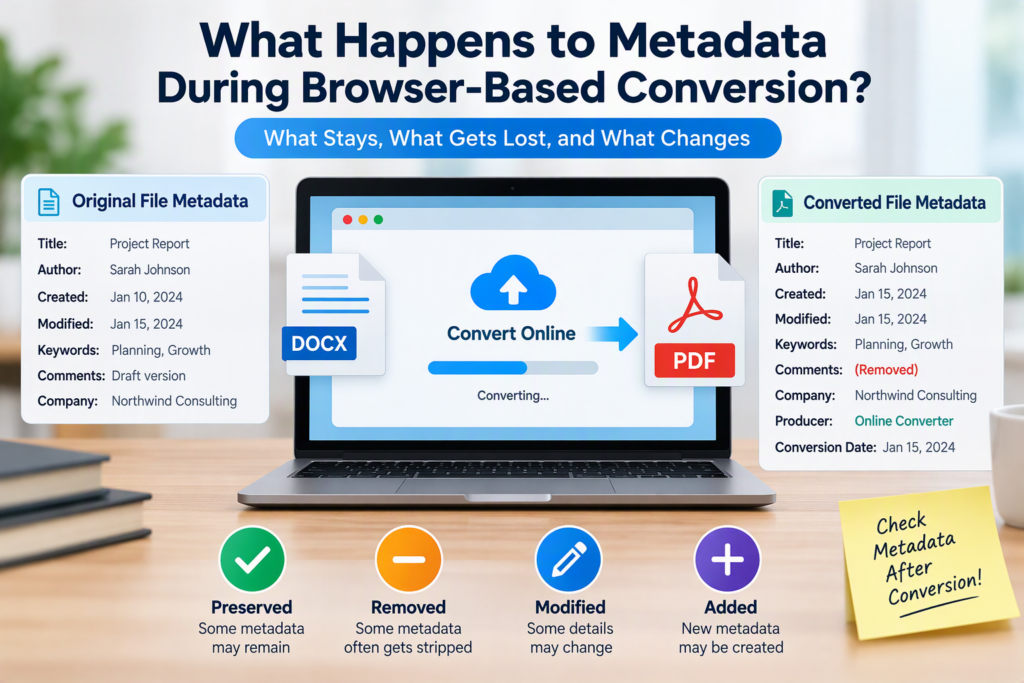
When you use a browser-based file conversion tool, metadata may be preserved, modified, stripped out, or recreated depending on the file types involved and how the conversion service works. In many cases, basic document properties such as title, author, creation date, keywords, GPS location data, editing history, and application-specific information are either removed or only partially retained. If metadata matters for privacy, compliance, archiving, or search-ability, you should never assume it survives a conversion unchanged.
Understanding what happens to metadata during browser-based conversion can help you avoid accidental data leaks, preserve important information, and choose the right conversion tool for your needs.
What Is Metadata?
Metadata is often described as “data about data.” It provides information about a file without being part of the visible content itself.
Common metadata examples include:
| File Type | Metadata Examples |
|---|---|
| Documents | Author, title, subject, creation date, revision history |
| Images | Camera model, GPS coordinates, copyright information, date taken |
| PDFs | Author, creator application, keywords, modification date |
| Audio Files | Artist, album, track number, genre |
| Videos | Resolution, recording device, location data, encoding settings |
Metadata can serve useful purposes, such as organizing files, improving search results, validating ownership, or meeting regulatory requirements. However, it can also contain sensitive information that users do not realize is embedded in a file.
What Is Browser-Based Conversion?
Browser-based conversion refers to converting files through an online service that runs through your web browser rather than a locally installed application.
Examples include:
- Converting Word documents to PDF online
- Turning PNG images into JPG files
- Transforming Excel spreadsheets into CSV format
- Converting video or audio files using a web-based tool
Although the process appears simple, several operations occur behind the scenes:
- The file is uploaded.
- The service processes the file.
- The file is converted into a new format.
- The converted file is generated and downloaded.
During these steps, metadata handling depends on how the service processes and rebuilds the file.
Why Metadata Often Changes During Conversion
Many file conversions do not simply copy data from one format into another. Instead, the conversion software extracts content from the original file and creates an entirely new file in the target format.
Because of this reconstruction process:
- Some metadata fields may not have corresponding fields in the new format.
- Certain properties may be ignored.
- New metadata may be generated automatically.
- Unsupported metadata may be discarded.
Think of conversion as rebuilding a house using materials from the original structure. You may keep the walls and furniture, but small details such as labels, notes, or hidden compartments can disappear.
What Happens to Metadata in Common Conversion Scenarios?
Word to PDF
This is one of the most common browser-based conversions.
Metadata that may be preserved:
- Document title
- Author name
- Subject
- Keywords
Metadata that may be removed:
- Revision history
- Comments
- Tracked changes
- Custom document properties
Some converters also replace the original creator information with metadata indicating the conversion software that generated the PDF.
As a result, the PDF may contain different metadata from the original Word document even when the visible content looks identical.
PDF to Word
Converting PDFs back into editable documents often leads to more significant metadata loss.
Potentially retained:
- Title
- Author
- Basic document properties
Frequently lost:
- PDF-specific metadata
- Digital signatures
- Security settings
- Embedded document structure information
The newly generated Word file typically receives its own metadata based on the conversion process.
PNG to JPG
Image file conversions often affect metadata differently.
PNG files can contain:
- Copyright information
- Creation dates
- Text descriptions
JPEG files often include:
- EXIF data
- Camera settings
- GPS coordinates
Depending on the converter:
- Some metadata may transfer successfully.
- Some may be stripped entirely.
- GPS coordinates may be removed.
- New compression-related information may be added.
Users frequently assume image metadata remains untouched when converting formats, but this is not always true.
RAW Images to JPEG
Photographers often convert RAW files into JPEG format for sharing.
Metadata outcomes can vary:
- Camera model may remain.
- Exposure settings may remain.
- Editing information may disappear.
- Proprietary camera metadata may be removed.
This can affect professional workflows where preserving image information is important.
Excel to CSV
CSV files have a major limitation: they contain plain text data.
When converting spreadsheets to CSV:
- Formulas typically disappear.
- Formatting is removed.
- Workbook metadata is often lost.
- Multiple sheets may not be preserved.
The result is a simple text-based representation of the data with very limited metadata support.
Why Some Metadata Gets Removed Intentionally
Metadata stripping is not always an accident.
Many online converters deliberately remove metadata for reasons such as:
Privacy Protection
Metadata can reveal:
- User names
- Device information
- GPS locations
- Company details
Removing metadata helps reduce accidental disclosure of personal information.
File Size Reduction
Metadata can increase file size.
Although the increase is usually small, removing unnecessary information helps optimize files for:
- Websites
- Email attachments
- Cloud storage
Security Concerns
Metadata can sometimes expose:
- Internal system details
- Software versions
- Editing history
- Hidden comments
Organizations may intentionally remove metadata before sharing files externally.
What Metadata Can Be Added During Conversion?
Conversion does not only remove metadata. In many cases it creates new metadata.
Examples include:
- Conversion software name
- Conversion date
- Processing application
- Encoding settings
- Compression details
For example, a PDF created through an online converter may identify the converter itself as the creator application rather than the original authoring software.
Similarly, newly encoded images or videos often contain fresh technical metadata generated during processing.
Browser-Based Conversion and Privacy Risks
One reason metadata receives attention is privacy.
A file may appear harmless while containing hidden information such as:
- Exact location where a photo was taken
- Name of the original document author
- Internal company department names
- Device identifiers
- Editing timestamps
If a converter preserves metadata, this information may remain in the downloaded file.
If a converter stores files on its servers, additional privacy concerns may arise depending on its retention policies and security practices.
Before using an online conversion service, review:
- Privacy policy
- Data retention policy
- Security practices
- File deletion procedures
This is especially important when handling confidential information.
A Practical Example
Imagine an employee creates a report in Microsoft Word.
The document metadata contains:
- Author: Sarah Johnson
- Company: North-wind Consulting
- Creation Date: January 10
- Revision Count: 18
- Internal Comments
The employee converts the file to PDF using a browser-based conversion service.
Possible outcomes:
| Metadata Item | Result After Conversion |
|---|---|
| Author | Preserved |
| Company | Preserved |
| Creation Date | Modified |
| Revision Count | Removed |
| Comments | Removed |
| Converter Information | Added |
The visible document appears unchanged, but the hidden data has changed significantly.
This illustrates why metadata should always be verified after conversion rather than assumed.
How to Check Metadata After Conversion
If metadata matters, inspect the converted file before distributing it.
For PDFs
Open properties information and review:
- Title
- Author
- Subject
- Keywords
- Creator
- Producer
For Images
Check:
- EXIF data
- GPS information
- Camera settings
- Copyright fields
For Documents
Review:
- Author fields
- Last modified information
- Custom document properties
Many operating systems provide basic metadata viewing tools, while specialized metadata inspection software can reveal additional details.
Common Misconceptions About Metadata Conversion
“Everything Is Preserved”
This is often false.
Many conversions retain only a subset of metadata.
“Metadata Is Always Deleted”
Also false.
Some converters preserve extensive metadata by default.
“Visible Content Is All That Matters”
Hidden data can affect:
- Privacy
- Compliance
- Legal discovery
- Digital asset management
Ignoring metadata can create unexpected problems later.
“All Conversion Tools Behave the Same Way”
Different services handle metadata differently.
Two converters can produce visually identical files while generating very different metadata outputs.
Metadata Preservation vs. Metadata Removal
The right outcome depends on your objective.
Preserve Metadata When
You need:
- Archival accuracy
- Digital asset management
- Copyright information
- Research records
- Regulatory compliance
Remove Metadata When
You want:
- Enhanced privacy
- Anonymous file sharing
- Smaller files
- Reduced information exposure
Neither approach is universally better. The best choice depends on the use case.
Best Practices for Browser-Based Conversions
If metadata is important, follow a structured approach.
Before Conversion
- Identify metadata that must be preserved.
- Determine whether any metadata contains sensitive information.
- Create a backup of the original file.
During Conversion
- Use reputable conversion services.
- Review privacy policies.
- Avoid uploading confidential files to unknown platforms.
After Conversion
- Inspect metadata manually.
- Verify important fields remain intact.
- Remove unwanted metadata before sharing.
- Test files used in regulated or professional environments.
These steps reduce surprises and help maintain control over file information.
Frequently Asked Questions
Does converting a file always remove metadata?
No. Some metadata may be preserved, some may be removed, and new metadata may be created during conversion. The outcome depends on the file format and conversion tool.
Can browser-based converters remove GPS location data from photos?
Yes. Many conversion services strip image metadata, including GPS coordinates, although some preserve it. You should verify the output file rather than assume either behavior.
Is metadata loss permanent after conversion?
If the original file is retained, you can usually recover metadata by returning to that original version. Once the only remaining copy is a converted file, lost metadata may be difficult or impossible to restore.
Are online converters safer than desktop converters for metadata privacy?
Not necessarily. Both can preserve or remove metadata. Privacy depends on the software’s behavior, security controls, and file handling policies.
How can I tell if metadata was changed?
Compare the original and converted files using file property tools or metadata inspection software. This reveals which fields were preserved, modified, added, or removed.
Final Thoughts
Browser-based conversion changes more than file formats. It also affects the hidden information attached to those files. Depending on the converter and file types involved, metadata may be preserved, altered, stripped out, or regenerated entirely.
If metadata matters for privacy, compliance, digital asset management, or record-keeping, treat conversion as a process that requires verification rather than assumption. Review both the original and converted files, check the metadata that matters most, and choose conversion tools that align with your specific requirements. A few minutes of verification can prevent lost information, privacy issues, and unexpected surprises later.