Image Metadata Explained: EXIF, GPS and Other Hidden Details
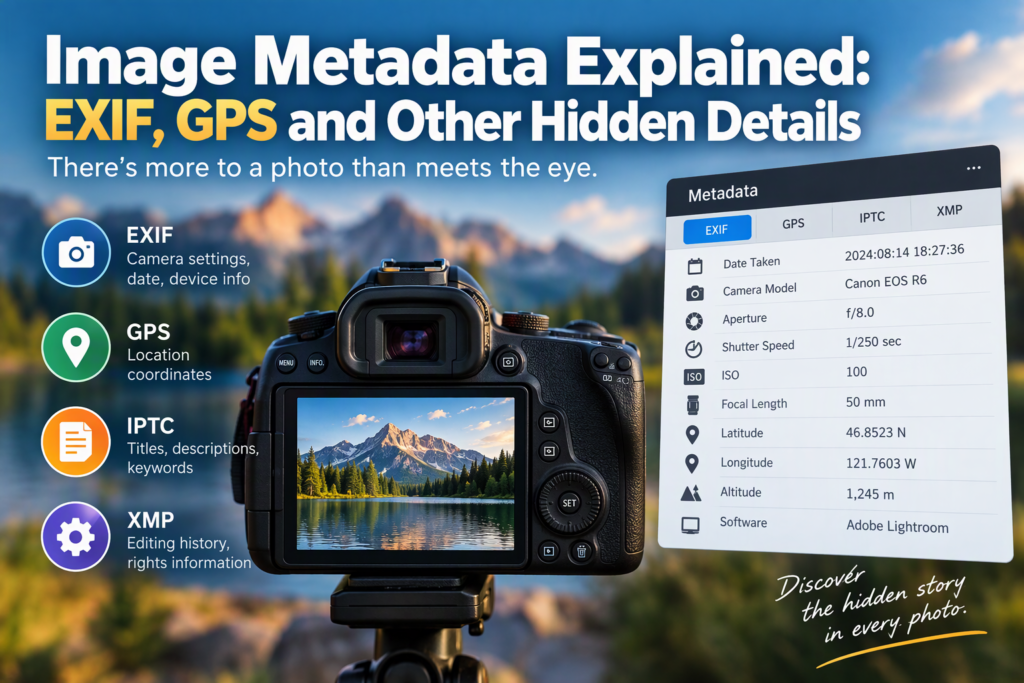
Every digital photo contains more than just the visible image. Hidden inside the file is metadata, a collection of information that can reveal when a photo was taken, what device captured it, the camera settings used, and sometimes even the exact location where it was shot. Understanding image metadata helps you organize photos, verify authenticity, protect privacy, and troubleshoot photography issues.
Whether you’re a casual smartphone user, a photographer, or someone sharing images online, knowing what’s stored behind the scenes can help you make smarter decisions about your pictures.
What Is Image Metadata?
Image metadata is data stored within an image file that describes the photo and its characteristics. Think of it as a digital label attached to the image.
While the picture itself contains visual information, metadata provides context about that image. Cameras, smartphones, editing software, and operating systems automatically add many types of metadata during creation and editing.
A typical image file may contain information such as:
- Date and time the photo was taken
- Camera or phone model
- Lens specifications
- Exposure settings
- GPS coordinates
- Software used for editing
- Copyright information
- File dimensions and format
Most users never see this information unless they actively inspect it, but it travels with the image unless removed.
Understanding EXIF Data
EXIF stands for Exchangeable Image File Format. It is the most common type of metadata found in digital photos.
When you take a picture with a smartphone, digital camera, or tablet, the device often automatically records EXIF information alongside the image.
Common EXIF Information
EXIF data may include:
| Metadata Field | What It Means |
|---|---|
| Date Taken | When the image was captured |
| Camera Make | Manufacturer of the device |
| Camera Model | Specific device used |
| Exposure Time | How long the shutter remained open |
| Aperture | Lens opening size |
| ISO | Camera sensor sensitivity |
| Focal Length | Zoom or lens setting |
| Flash Status | Whether flash was used |
| Image Resolution | Width and height of the image |
| Orientation | How the image should be displayed |
For photographers, EXIF data acts like a record of camera settings. Reviewing these details makes it easier to learn from successful shots or identify problems in unsuccessful ones.
Example
Imagine you take a sunset photo and love the result. Checking the EXIF data might reveal:
- Aperture: f/8
- ISO: 100
- Shutter Speed: 1/250 second
- Focal Length: 50mm
Later, you can use similar settings when shooting under similar conditions.
What Is GPS Metadata?
GPS metadata stores geographic location information within a photo.
Many smartphones and some cameras can embed latitude and longitude coordinates into image files when location services are enabled.
This allows a photo to carry information about exactly where it was taken.
What GPS Data Can Include
Location metadata may contain:
- Latitude
- Longitude
- Altitude
- Direction of travel
- Location timestamp
Photo management apps often use this information to organize images by place.
For example:
- Vacation photos can automatically appear on a map.
- Images can be sorted by city or country.
- Travel albums can be created using location history.
Why GPS Data Matters
GPS metadata is incredibly useful for:
- Travel photography
- Wildlife observation
- Real estate documentation
- Event organization
- Personal photo archiving
However, it also creates privacy concerns because shared photos may reveal home addresses, workplaces, schools, or other sensitive locations.
Other Types of Image Metadata
EXIF and GPS data receive the most attention, but several other metadata categories exist.
IPTC Metadata
IPTC stands for International Press Telecommunications Council.
It was developed to help media organizations manage and distribute images.
IPTC fields commonly include:
- Photo title
- Description
- Caption
- Keywords
- Creator name
- Copyright notice
- Contact information
News agencies, photographers, and image libraries frequently rely on IPTC data to organize large collections.
XMP Metadata
XMP stands for Extensible Metadata Platform.
It was introduced to provide a more flexible way to store metadata.
XMP can include:
- Editing history
- Rights management information
- Keywords
- Ratings
- Labels
- Creative project information
Many professional editing applications use XMP extensively.
File Metadata
Basic file metadata comes from the operating system rather than the camera.
Examples include:
- File size
- Creation date
- Modification date
- File format
- Storage location
While less detailed than EXIF data, file metadata remains useful for file management and organization.
How Image Metadata Is Created
Metadata can be added from different sources throughout a photo’s life cycle.
During Capture
The camera or smartphone creates:
- EXIF information
- Camera settings
- Date and time
- GPS coordinates (if enabled)
During Editing
Photo editing software may add:
- Software version
- Edit history
- Color corrections
- Keywords
- Ratings
During Publishing
Image management systems and websites may add:
- Copyright fields
- Watermark information
- Asset identifiers
- Content management data
This means metadata often grows over time as the image moves between devices and applications.
How to View Image Metadata
Most operating systems allow you to inspect image metadata without special software.
On Windows
- Right-click the image file.
- Select Properties.
- Open the Details tab.
You’ll usually see:
- Dimensions
- Camera model
- Date taken
- Exposure information
- GPS data (if available)
On macOS
- Open the image in Preview.
- Click Tools.
- Select Show Inspector.
- View the metadata sections.
On Smartphones
Many gallery applications display photo information.
Typically, you can:
- Open the image.
- Tap the information or details icon.
- Review metadata fields.
The available information varies by device and application.
Using Specialized Tools
Professional tools often reveal far more metadata than standard operating systems.
These applications can display:
- Complete EXIF records
- GPS coordinates
- Editing histories
- Copyright information
- Advanced technical fields
They are particularly useful for photographers, investigators, archivists, and digital asset managers.
Why Photographers Use Metadata
Metadata serves practical purposes beyond technical curiosity.
Learning From Previous Shoots
By examining successful images, photographers can identify settings that produced desirable results.
Instead of guessing, they can review exact exposure details.
Organizing Large Libraries
Thousands of photos become easier to manage when metadata is used for:
- Searching
- Filtering
- Sorting
- Categorizing
A photographer can quickly find all images taken with a specific camera, lens, location, or date range.
Copyright Protection
Metadata fields can store copyright and ownership information.
This helps establish authorship and provide contact information when images are shared online.
Although metadata alone doesn’t prevent theft, it can support ownership claims and attribution.
Privacy Risks of Image Metadata
One of the most important aspects of metadata is privacy.
Many users unknowingly share sensitive details when uploading photos to websites, forums, or social media.
Location Exposure
GPS metadata may reveal:
- Home addresses
- Schools
- Offices
- Frequently visited locations
For example, a seemingly harmless backyard photo could contain coordinates pointing directly to someone’s residence.
Device Information
Metadata may disclose:
- Phone models
- Camera models
- Software versions
While usually harmless, this information contributes to a broader digital footprint.
Timestamp Information
Photos often store exact dates and times.
This can reveal:
- Travel schedules
- Daily routines
- Personal habits
Combined with location data, timestamps can expose more information than many users realize.
Do Social Media Platforms Remove Metadata?
Many major social media platforms remove some metadata during upload.
This is often done to:
- Reduce file size
- Improve performance
- Protect privacy
However, practices vary between services and can change over time.
Some platforms remove GPS data while preserving other information. Others may strip nearly all metadata.
Because policies differ, users should not assume every platform removes sensitive information automatically.
If privacy matters, it is safer to remove metadata before sharing.
How to Remove Metadata From Images
Removing metadata reduces the amount of hidden information attached to a photo.
On Windows
You can often:
- Right-click the image.
- Open Properties.
- Choose Details.
- Select Remove Properties and Personal Information.
On Smartphones
Many modern devices provide options to:
- Turn off location tagging
- Remove location before sharing
- Export images without metadata
Using Editing Software
Photo editing applications frequently include export settings that allow users to:
- Remove GPS information
- Strip EXIF data
- Export privacy-friendly copies
This is especially useful when posting images publicly.
Metadata and Image Authenticity
Metadata is sometimes used to evaluate the authenticity and history of an image.
Investigators, journalists, and researchers may examine metadata to determine:
- When a photo was captured
- What device created it
- Whether it was edited
- Which software processed it
However, metadata should never be considered definitive proof.
Important Limitation
Metadata can be:
- Edited
- Deleted
- Rewritten
- Fabricated
For example, changing a file’s metadata does not alter the visual image itself.
Because of this, metadata should be treated as supporting evidence rather than unquestionable truth.
Common Misconceptions About Image Metadata
“Metadata Is Always Accurate”
Not necessarily.
Incorrect device clocks, software modifications, and manual edits can lead to inaccurate records.
“Every Image Contains GPS Coordinates”
No.
GPS data only exists if the capturing device recorded location information and stored it in the file.
“Removing Metadata Changes Image Quality”
Usually not.
Metadata exists separately from the image pixels. Removing it generally affects information attached to the file rather than the visible picture.
“Metadata Guarantees Copyright Ownership”
Metadata can help indicate ownership, but it is not a substitute for copyright law or proper legal documentation.
Practical Metadata Checklist Before Sharing Photos
Before uploading images publicly, consider reviewing the following:
✅ Check for GPS coordinates
✅ Remove location information if privacy is a concern
✅ Verify copyright details if you are the creator
✅ Confirm timestamps are accurate
✅ Review personal information stored in metadata
✅ Export a clean copy when sharing publicly
✅ Keep the original version archived safely
This simple review can prevent accidental disclosure of sensitive information.
FAQs
Can metadata be removed completely?
In many cases, yes. Most metadata fields can be stripped using operating system tools or image editing software. Some file information required for the image format may remain.
Does a screenshot contain the original photo’s metadata?
Usually not. A screenshot often creates a new image file with its own metadata rather than preserving the full metadata from the original image.
Can metadata reveal where a person lives?
Potentially. If GPS tagging was enabled when a photo was taken at home, the coordinates may identify the location with considerable accuracy.
Do PNG and JPEG files both support metadata?
Yes. Both formats can contain metadata, although JPEG files commonly store extensive EXIF information.
Can metadata prove that a photo is fake?
Not by itself. Metadata can provide clues about editing or file history, but authenticity typically requires additional analysis.
Final Thoughts
Image metadata is an invisible layer of information that adds context to digital photos. EXIF data records camera settings, GPS metadata can reveal where an image was taken, and other metadata types help with organization, copyright management, and workflow tracking. While this information is valuable for photographers and archivists, it can also introduce privacy risks when images are shared publicly.
The next time you upload a photo, take a moment to inspect its metadata. Understanding what information travels with your images gives you more control over both your photography and your privacy.